
Text, image, video, and audio input
Describe what is new in text, then use references for details that are easier to show: a person, place, movement, camera path, performance, or soundtrack.
Create a polished 4–15 second shot from text and image, video, or audio references. Direct the performance, camera, continuity, and native sound, with resolution options from 480p to 4K.
Seedance 2.0 multimodal creation
Seedance 2.0 accepts text, image, video, and audio input. Give each reference a defined role—identity, location, movement, camera, voice, or rhythm—so the model can follow a production brief instead of guessing how the files relate.
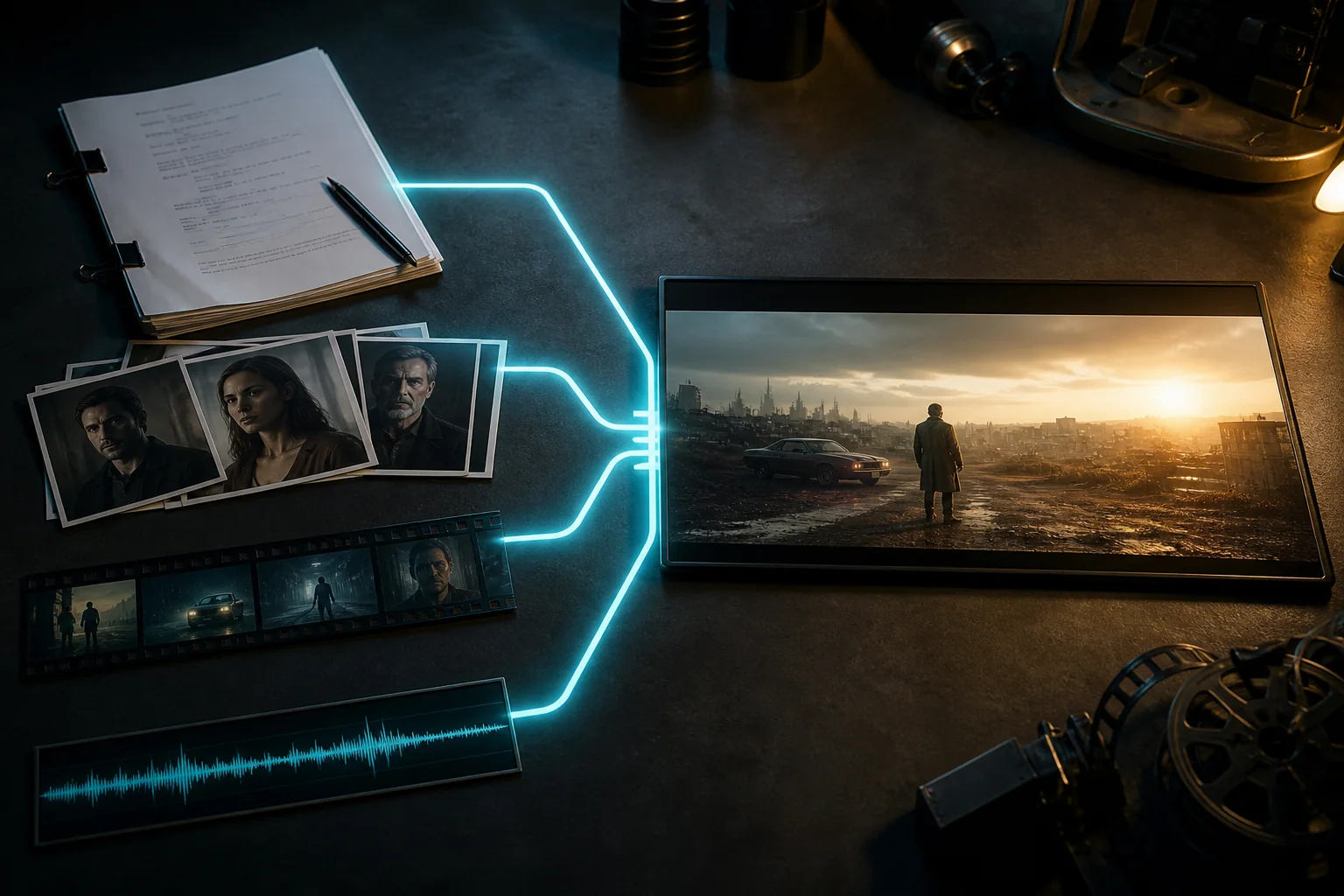
Use each reference for one clear purpose and make every shot change visible.
Describe what is new in text, then use references for details that are easier to show: a person, place, movement, camera path, performance, or soundtrack.
Create dialogue, ambience, effects, and music with the image sequence so sound timing can be directed as part of the scene.
Use lower resolutions for working versions and select 1080p or 4K when the approved shot needs more delivery detail.
Start from text, animate a first frame, connect first and last frames, or use multimodal references according to the element that must stay stable.
Seedance 2.0 use cases
Seedance 2.0 is a strong general-purpose choice for short production shots that need more control than a prompt alone and more output detail than Mini or Fast.
Direct an athletic or physical sequence while preserving the main subject, contact points, environment, and camera path.
How to use Seedance 2.0
Separate the brief into subject, action, camera, sound, and continuity. If an instruction cannot be seen or heard in the result, make it more concrete.
01
State who or what appears, the action that happens, and the final composition the shot should reach.
02
Name which image, clip, or audio file controls identity, place, movement, lighting, voice, or rhythm.
03
Specify shot size, camera path, pace, dialogue, ambience, effects, and whether cuts or captions are allowed.
04
Check faces, hands, props, spatial relationships, motion boundaries, and audio timing before judging texture or style.
Seedance 2.0 prompt guide
Move from scene and subject to action, camera, sound, and continuity. Keep every instruction specific enough to verify in the generated video.
12-second Seedance 2.0 prompt example
SCENE — 16:9 cinematic realism at a warm night market. Preserve the chef from @Image 1 and the stall layout from @Video 1. ACTION — Follow the chef plating noodles, cut to a macro view of steam, then reveal the shared table. CAMERA — Smooth shoulder-height tracking, one clean cut, slow final pull-back. AUDIO — Natural cooking sounds and quiet conversation; no music or subtitles. CONTINUITY — Keep the face, apron, cookware, and light direction stable.
Establish scene and identity
Define the world, main subject, visual treatment, and the reference details that cannot drift.
Write the action in sequence
Use one readable action per beat and make the cause, order, and final state unambiguous.
Specify camera and timing
Name shot size, lens behavior, movement, cut points, and the moment when the final reveal should occur.
Describe sound and exclusions
State dialogue, ambience, effects, music, and anything that must not appear or be heard.
Seedance model comparison
Compare what changes the result in this workspace: resolution, duration, reference allowance, relative credits, and whether the priority is exploration, review, or final quality.
Seedance model selection
Use the standard model when a short video needs high-resolution options, multimodal control, and native sound. Mini costs less, Fast shortens the feedback loop, and 2.5 extends the sequence.
It fits cinematic shots, controlled action, campaign concepts, and social video that benefits from mixed references and output up to 4K.
Create with Seedance 2.0Choose Mini for lower-credit exploration or Fast when reaching a creative review decision sooner is the main concern.
Compare Seedance 2.0 MiniMove to Seedance 2.5 when the story needs up to 30 seconds, a much larger reference set, or more detailed direction across multiple beats.
Seedance 2.0 FAQ
Answers about supported inputs, reference limits, video length, 4K, native audio, prompting, and model selection.
Seedance 2.0 creates short multimodal video from text and optional image, video, or audio references. It supports directed motion, camera behavior, continuity, and native sound.
This workspace supports 4–15 second output at 480p, 720p, 1080p, or 4K in several landscape, portrait, square, and wide aspect ratios.
Supported reference workflows accept up to 9 images, 3 videos, and 3 audio files. Assign each file a clear purpose to reduce conflicting direction.
Yes. It can generate dialogue, ambience, effects, and music with the visuals. Describe the role and timing of each sound, or turn audio off for a silent draft.
Standard offers the broadest resolution range up to 4K. Fast targets lower latency, Mini uses fewer credits, and 2.5 supports up to 30 seconds and a much larger reference set.
Start with format, scene, and subject. Add actions in order, camera movement, timing, and sound, then finish with continuity rules and clear exclusions.
Create with Seedance 2.0
Choose the format, assign each reference a purpose, and write the action in sequence to generate a controlled 4–15 second video.